Notion Second Brain Guide: Master Organization in 2025
Master organization in 2025 with this Notion Second Brain guide. Learn proven frameworks, advanced features, and expert tips to streamline your digital life.
Drowning in digital information is the new normal in 2025. Every day brings a flood of emails, notes, and to-dos that seem impossible to organize.
That is where the notion second brain comes in, offering a clear path to mastering both personal and professional organization. Imagine having a digital extension of your mind that captures, sorts, and retrieves everything you need, exactly when you need it.
In this guide, you will discover what a second brain is, how to set up Notion for the future, proven frameworks like PARA for structure, powerful features to boost productivity, and step-by-step strategies to keep your system running smoothly.
If you are ready to transform chaos into clarity, follow along and unlock the full potential of your digital life.
What Is a Second Brain? The Foundation of Modern Organization
In 2025, the sheer volume of digital information can feel overwhelming. Managing knowledge, ideas, and daily tasks is more complex than ever. The notion second brain system offers a structured way to regain control, keep your mind clear, and stay focused amid constant digital noise.
Defining the Second Brain Concept
The idea of a second brain was popularized by productivity expert Tiago Forte. His PARA method—Projects, Areas, Resources, Archives—provides a clear framework for organizing information. A second brain acts as a digital extension of your mind, storing notes, resources, and ideas for easy access and retrieval.
In today’s fast-paced world, the notion second brain is more important than ever. As data multiplies, a reliable system prevents overload and ensures nothing valuable gets lost. To dive deeper into the PARA framework, see Tiago Forte's PARA Method for practical guidance.
Why Notion Is the Ideal Second Brain Platform
Notion stands out for its unmatched flexibility, making it the top choice for building a notion second brain. Unlike single-purpose tools, Notion combines notes, tasks, databases, and project management in one workspace.
Professionals and students alike praise Notion for its customizable dashboards and seamless integrations. The platform enjoys an excellent rating, reflecting widespread satisfaction and trust based on numerous user reviews.
Key Benefits of a Second Brain System
Adopting a notion second brain can transform how you handle information and daily responsibilities. Key benefits include:
Benefit | Description |
|---|---|
Reduced Overload | Centralizes all information for easy management |
Enhanced Creativity | Quick access to ideas and resources for inspiration |
Improved Productivity | Eliminates app-switching and silos |
Peace of Mind | Serves as a reliable external memory |
These advantages help you stay organized, focused, and ready to tackle any challenge.
Real-World Examples and Use Cases
A notion second brain adapts to every lifestyle and profession. Students use it to track assignments, manage reading lists, and organize study notes. Entrepreneurs rely on it for project management and goal tracking. Families benefit by coordinating schedules, chores, and important documents.
One user shares, “I use it to manage both my family life and professional projects.” Companies such as Snowflake, Samsara, and JungleScout trust second brain templates to streamline their workflows and knowledge management.
The Evolution of Second Brain Systems in 2025
The notion second brain has evolved rapidly, thanks to advances in AI, automation, and new Notion features. AI agents now help with content summarization, task automation, and intelligent search, taking productivity to new heights.
Staying adaptable is key. Modern second brain systems leverage these innovations to remain effective, efficient, and future-proof. As you build your own, embracing these changes ensures your system continues to serve you well.
Step 1: Setting Up Your Notion Workspace for Second Brain Success
Staying organized is essential in 2025, and building your notion second brain begins with the right workspace foundation. Let’s walk through how to set up your digital environment for ongoing clarity and productivity.
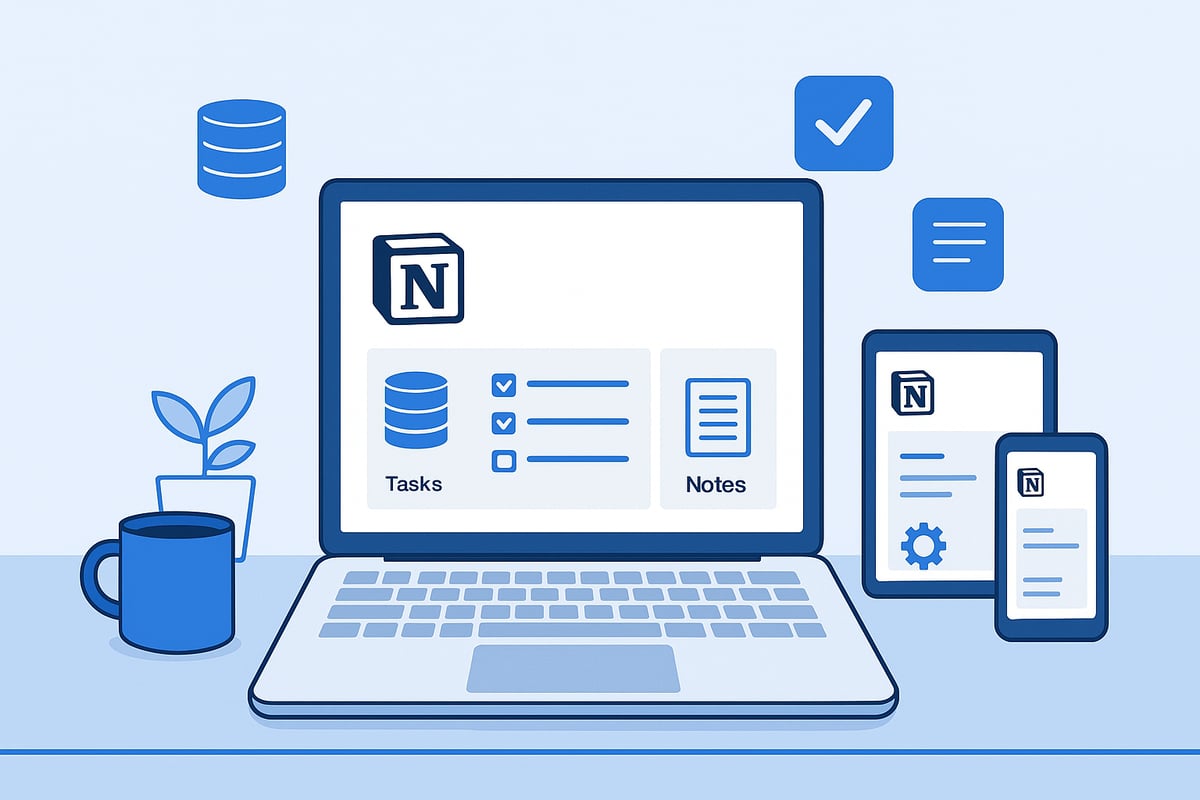
Preparing Your Digital Environment
Start by creating a dedicated notion second brain space. Open Notion and establish a new page specifically for your Second Brain system.
Keep your structure simple. Set up a main dashboard for quick navigation. Use sidebar links to core areas like Projects, Tasks, Notes, and Resources. Make sure your layout is mobile-friendly, so you can access your system anywhere.
Consider these best practices:
Stick to clear, descriptive page names.
Use the Favorites feature in Notion to pin in your dashboard and most-used pages to the sidebar
Use Notion’s mobile app to test responsiveness and usability.
A well-organized environment lays the groundwork for your notion second brain’s long-term success.
Essential Notion Features to Master
Unlock the power of your notion second brain by mastering core Notion features. Start with databases, which allow you to store and organize information in tables, lists, and boards. Linked databases let you view and filter the same data across multiple pages, keeping everything in sync.
Explore relations to connect different databases, such as linking tasks to projects. In 2025, Notion offers advanced features like AI agents for automating routine tasks, enterprise search for finding information fast, and new automation tools to reduce manual work.
Don’t overlook user experience. Light and dark mode settings help with comfort and focus. Make sure your workspace displays well on phones, tablets, and desktops for seamless access to your notion second brain.
Choosing the Right Second Brain Template
Templates accelerate your notion second brain setup. Notion’s template gallery features over 300 options, but choosing the right one is key. Look for templates designed around proven frameworks like PARA.
When comparing templates, focus on:
Customization
Scalability
User Support
Price
Prioritize customization, scalability, and available support. Free templates offer a fast start, while premium versions often include enhanced features and support.
For inspiration, browse our Notion template collection, which curates systems for a variety of personal and professional needs.
Customizing Your Second Brain for Personal Needs
Your notion second brain should fit your unique workflow. Tailor dashboards for work, study, hobbies, or family organization. Add custom databases, such as a book tracker, daily journal, or habit tracker.
Tips for intuitive design:
Use icons and covers for visual cues.
Group related databases together.
Create quick-access links for frequently used pages.
Experiment with layouts until navigation feels natural. A visually appealing and logically organized workspace motivates you to keep using your notion second brain daily.
Ensuring Long-Term Usability and Scalability
Sustain your notion second brain by planning for growth. Add a simple onboarding page within your workspace to guide future updates or share with collaborators.
Schedule regular reviews—weekly or monthly—to archive outdated items and refine your setup. Stay engaged with the Notion community for troubleshooting, video tutorials, and template walkthroughs.
As your needs evolve, update your system to stay relevant. Long-term usability ensures your notion second brain remains a powerful tool, not just another digital folder.
Step 2: Structuring Your Notion Second Brain with Proven Frameworks
Building a robust notion second brain starts with a solid foundation. Proven frameworks help transform Notion from a blank canvas into a powerful, organized system. Let’s explore how you can use these frameworks to structure your digital mind for clarity and productivity.
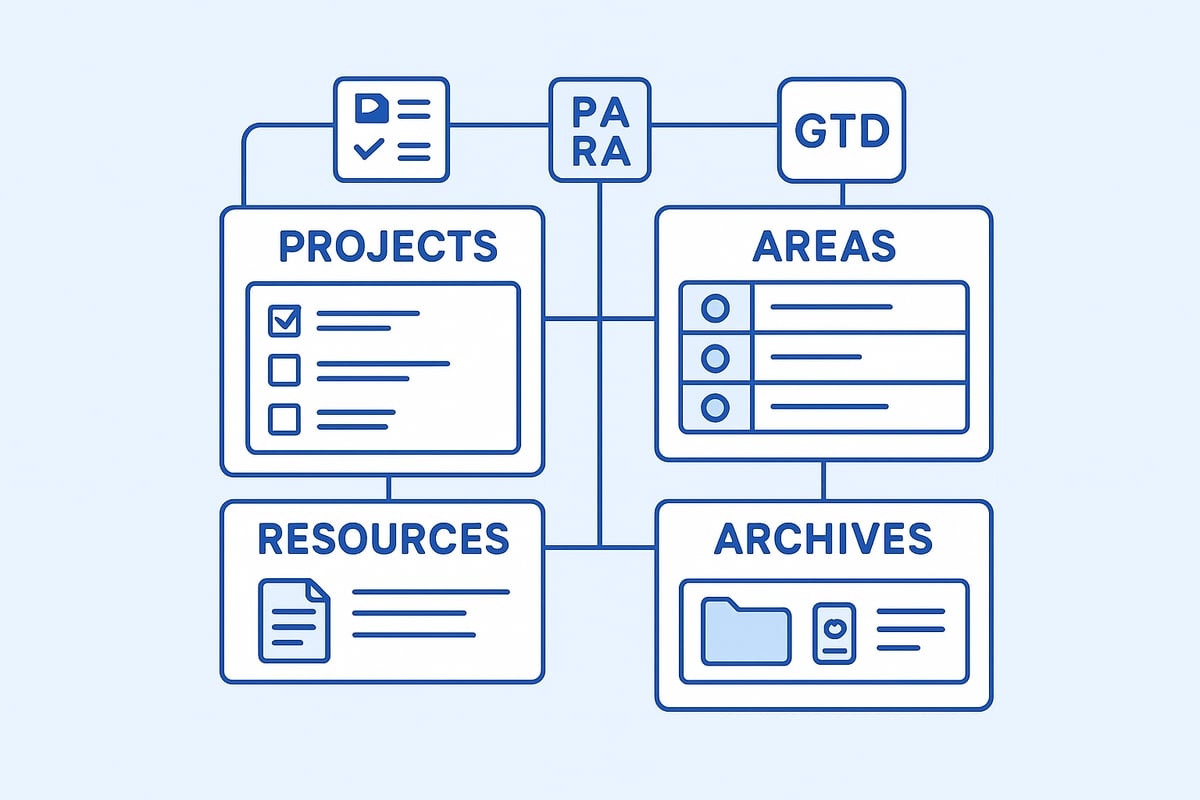
Introducing the PARA Method and Other Frameworks
The PARA method, created by Tiago Forte, stands for Projects, Areas, Resources, and Archives. It’s designed to help you sort every piece of information in your notion second brain according to its purpose and relevance. Each category has a distinct role: Projects are active goals, Areas are ongoing responsibilities, Resources are reference materials, and Archives are for inactive items.
Notion’s flexibility allows you to blend PARA with other popular frameworks. Getting Things Done (GTD) focuses on capturing and processing actionable tasks, while the Eisenhower Matrix helps you prioritize by urgency and importance. Many templates, such as PARA Dashboard Template, combine these systems for a streamlined workflow. This integration is key for adapting your notion second brain to your unique needs.
Building Your Core Second Brain Databases
A successful notion second brain relies on a set of interconnected databases. Start by creating databases for Projects, Areas, Tasks, Notes, and Resources. Linking these databases enables seamless navigation and ensures that information flows naturally between different parts of your system.
For example, you might link Tasks to Projects, so every task is associated with a project. Notes can link to Resources, allowing you to reference materials quickly. This relational structure is a major strength of Notion, setting your notion second brain apart from other tools.
Organizing Projects and Areas for Clarity
Organization is at the heart of an effective notion second brain. Begin by listing your high-level Areas, such as Health, Career, or Personal Growth. Within each Area, break down your work into Projects that have clear outcomes and deadlines.
Dedicated dashboards for each Area and Project make it easy to focus. With these dashboards, you can filter tasks, monitor progress, and avoid information overload. This approach ensures your notion second brain remains clear and actionable.
Capturing and Processing Information Efficiently
Efficient capture is essential for keeping your notion second brain up to date. Use a Quick Capture or Inbox database to instantly record ideas, tasks, and notes. This method prevents important information from slipping through the cracks.
Regularly process your Inbox by sorting items into the right databases. For example, turn a captured idea into a Project or link a note to a Resource. This workflow keeps your notion second brain organized and your mind clear.
Knowledge Management and Retrieval
A notion second brain excels at managing knowledge. Build a Knowledge Hub database to store articles, web clips, and personal notes. Organize information by Topic, and link it to relevant Projects or Areas.
This setup allows you to retrieve any piece of information within seconds. By centralizing knowledge, your notion second brain becomes a trusted reference for learning and decision-making.
Integrating Goals, Habits, and Journaling
To create a holistic notion second brain, think about adding databases for goals, habits, and journaling. Track your progress toward personal and professional milestones, build positive routines, and reflect on your daily experiences.
Popular templates include Habit Trackers, Book Trackers, and Daily Journals. These tools help you maintain balance and support continuous growth within your notion second brain.
Maintaining a Personal CRM and Resource Library
A personal CRM (Customer Relationship Management) database is invaluable for networking and staying connected. Track contacts, follow-ups, and important dates.
Both students and professionals benefit from these additions, as they turn your notion second brain into a comprehensive life management platform.
Step 3: Leveraging Advanced Notion Features for Productivity in 2025
Staying ahead in 2025 requires more than just storing information. To unlock the full power of your notion second brain, it is essential to leverage Notion’s most advanced features. By combining AI, automation, integrations, and thoughtful design, you can create a workspace that adapts to your needs and accelerates your productivity.
Utilizing Notion AI and Automation
Notion AI stands as a game-changer for the notion second brain. In 2025, Notion’s AI can summarize meeting notes, generate content, and automate repetitive tasks. These features save time and ensure your workspace always stays up to date.
For instance, AI agents can process incoming notes, extract action items, and assign tasks, reducing manual effort. With content summarization, you can quickly distill long articles or documents into actionable insights. Task automation allows you to set up recurring reminders and workflows that keep your projects moving.
If you want to explore practical ways to supercharge your notion second brain with AI, check out Notion's AI-Powered Features, which dives deeper into the latest tools and integrations.
By integrating AI into your daily routines, your notion second brain becomes more adaptive and responsive, helping you focus on what truly matters.
Streamlining Workflows with Integrations
A seamless notion second brain connects all your key tools. Notion’s integrations with platforms like Google Calendar, Slack, Trello, and email ensure that information flows effortlessly between apps.
You can sync tasks from Notion to your calendar for real-time scheduling. Use Slack integrations to receive notifications about project updates or completed tasks. The web clipper makes capturing articles or resources from the internet a breeze.
Automating reminders and importing content from external sources allow you to manage everything from one central location. These integrations reduce context switching, letting you stay immersed in your workflow.
Combine integrations with Notion’s customizable databases to unify your digital environment. This approach turns your notion second brain into a true command center for both personal and professional organization.
Enhancing Focus and Prioritization
Staying focused in a world full of distractions is a constant challenge. Notion second brain templates now offer Conditional Color and Focus features that help you triage tasks based on urgency and importance.
Utilize methods like the Eisenhower Matrix or GTD within your workspace to categorize and prioritize work. Distraction-free dashboards, such as “My Day,” give you a clear view of your top priorities for the day.
Recurring task automation ensures nothing slips through the cracks, while visual cues highlight what needs your attention next. By structuring your notion second brain for clarity, you make it easier to maintain momentum and achieve your goals.
Here is a quick comparison of focus tools:
Feature | Benefit |
|---|---|
Conditional Color | Highlights urgent tasks |
Focus Mode | Minimizes distractions |
Recurring Automation | Keeps routines consistent |
Optimizing for Mobile and Cross-Device Use
Modern life demands flexibility. Your notion second brain should work flawlessly across all devices, whether you are on a laptop, tablet, or smartphone.
Notion’s responsive design ensures that every page and dashboard adapts to different screen sizes. Quick Capture tools let you jot down ideas or tasks on the go, and mobile widgets provide instant access to essential information.
For professionals and students alike, cross-device synchronization ensures you never miss a beat. Whether you are in a meeting, commuting, or studying, your notion second brain is always within reach.
Tips for optimizing mobile use:
Simplify navigation with clear icons
Use mobile-friendly widgets for fast entry
Enable offline access for productivity anywhere
Personalization with Light/Dark Mode and Aesthetic Design
Personalizing your notion second brain not only boosts motivation but also enhances usability. Notion’s light and dark modes allow you to choose the visual style that fits your environment.
Customize your workspace with unique icons, covers, and color themes. Many users find that an aesthetic dashboard encourages them to engage with their system daily. Templates designed for visual appeal often include coordinated palettes and icon sets.
A well-designed notion second brain reflects your personality while maintaining clarity and organization. Take advantage of trending customization features to create a workspace you are proud of.
Implementing Regular Reviews and Maintenance
A successful notion second brain is never static. Regular reviews—weekly and monthly—are essential for keeping your workspace relevant and clutter-free.
Set up recurring checklists to review tasks, projects, and notes. Use progress tracking dashboards to monitor goals and habits. These routines help you spot outdated information, reorganize priorities, and celebrate achievements.
Many users create a dedicated Review page within their notion second brain, making it easy to reflect and plan. Consistent maintenance ensures your system evolves alongside your needs.
Harnessing Community Resources and Tutorials
The Notion community is a valuable resource for anyone building a notion second brain. Online forums, video tutorials, and template galleries provide inspiration and practical support.
Participating in user groups allows you to exchange tips and troubleshoot challenges. Many creators share case studies and walkthroughs, making it easier to implement new features.
Staying engaged with the community keeps your notion second brain fresh and aligned with the latest best practices. Do not hesitate to explore tutorials or ask for advice as you refine your digital system.
Step 4: Daily Workflow—How to Use Your Notion Second Brain for Maximum Impact
Mastering your daily workflow is where the real power of your notion second brain comes to life. By integrating intentional routines into your day, you transform scattered information into actionable steps and meaningful progress. Let’s explore how each part of your day can be optimized for clarity, focus, and growth.
Morning Routine: Planning Your Day
Start your day by opening your main dashboard. Here, review your top priorities, scheduled meetings, and any urgent deadlines. A well-designed dashboard brings clarity to your morning and sets the intention for what matters most.
To maximize this step, consider using a Guide to Notion dashboard templates to create a workspace that fits your unique style. A focused dashboard is the anchor of your notion second brain, allowing you to move from reactive to proactive planning.
Review daily tasks and appointments
Check recurring habits and goals
Set focus time-blocks for the day
A clear morning review helps you prioritize and avoid feeling overwhelmed.
Capturing Ideas and Information Instantly
Throughout the day, inspiration can strike at any moment. The quick capture feature in your notion second brain ensures that no idea slips through the cracks.
Whether on mobile or desktop, use a dedicated inbox or capture database to jot down tasks, notes, or links. Later, process these items into the appropriate project, resource, or note database.
Capture tasks as they arise
Save article links or references for later review
Record voice memos or images if supported
Instant capture reduces mental clutter and keeps your mind open for deeper work.
Managing Projects and Tasks Throughout the Day
As you move through your workflow, update task statuses, add new subtasks, and track project milestones within your notion second brain. Visual tools like Kanban boards or timelines provide a clear overview of progress.
Move tasks between stages (To Do, In Progress, Done)
Attach notes or resources directly to tasks
Use filters to focus on today’s priorities
Smart prioritization features help you stay on track and adapt quickly to changes.
Knowledge Management and Learning
Dedicate time each day to expand your knowledge base. Use your notion second brain to add new book notes, articles, or insights to your knowledge hub.
Link relevant information to ongoing projects or goals for easy reference. Organizing knowledge by topic or tag makes retrieval effortless.
Summarize key takeaways from articles
Link related resources to action items
Store personal reflections for future use
A robust knowledge hub turns passive reading into actionable learning.
Evening Reflection and Review
At the end of your day, take a few minutes to reflect and reset. Use your daily journal or reflection database in your notion second brain to capture lessons learned, review completed tasks, and adjust goals.
Log daily wins and obstacles
Update habit trackers and progress dashboards
Plan tomorrow’s top priorities
Regular reflection ensures continuous improvement and keeps your system aligned with your evolving needs.
Adapting Your Workflow Over Time
Your notion second brain is designed to grow with you. Periodically assess your routines, experiment with new templates or features, and adjust workflows as your life and responsibilities change.
Try new capture or review methods
Integrate automation or AI features for efficiency
Join Notion communities for fresh ideas
Adaptation is key to long-term productivity and satisfaction.
Example: A Day in the Life with Notion Second Brain
Imagine starting your day by reviewing your dashboard, capturing ideas as they occur, managing tasks with clarity, learning something new, and ending with thoughtful reflection. Each step in your notion second brain is intentional, seamless, and tailored to your unique goals.
By following this workflow, you transform digital chaos into a system of clarity and action, unlocking your full potential every day.
Notion Second Brain Templates: The Best Options for 2025
Finding the right notion second brain template can transform how you manage information in 2025. With hundreds of expertly crafted templates available, the challenge becomes choosing the perfect fit for your needs. Whether you are a student, professional, or creative, there is a template designed to help you organize, track, and excel.
The notion second brain ecosystem is thriving, with new features and integrations pushing boundaries each year. Let us explore the best options for maximizing your digital organization.
Overview of Top Notion Second Brain Templates
The marketplace for notion second brain templates has grown rapidly. Leading options include the PARA Dashboard, Brainblocs, Second Brain by Rosidssoy, and MindVault. These templates offer a range of features, from advanced knowledge management to seamless task workflows.
Most top templates support full customization and integrate with the latest Notion features. Many users appreciate the flexibility of dashboards that combine notes, tasks, and databases in one view. Notion’s official gallery now boasts over 300 notion second brain templates, catering to every style and need.
Criteria for Choosing the Right Template
Selecting a notion second brain template depends on several factors. First, consider your user experience needs. Do you prefer a minimal interface or a feature-rich dashboard? Next, evaluate support, scalability, and ongoing updates.
Templates designed by certified Notion creators often provide better long-term value and more responsive support. Pricing is another factor. Free templates are a great starting point, but paid options often include advanced features and regular updates to support new Notion releases.
Key criteria to compare:
User experience and navigation
Support and documentation
Price (free vs paid)
Scalability for future growth
Update frequency
A well-chosen notion second brain template should evolve as your needs change in 2025.
How to Import and Customize Templates
Importing a notion second brain template is straightforward. Most creators provide a “duplicate” link that copies the template directly into your workspace. Once imported, customization is essential. Tailor dashboards, databases, and workflows to reflect your personal or professional goals.
For a step-by-step walkthrough, check out this guide on how to use Notion templates. You will find tips on adapting layouts, adjusting relations, and optimizing visual design for your own workflow.
Do not forget to explore embedded onboarding guides and setup videos included in many templates. These resources can help you master your notion second brain quickly and efficiently.
Specialized Templates for Unique Needs
No two users are alike, so the notion second brain ecosystem offers specialized templates for students, professionals, families, and creatives. For example, students can benefit from dashboards designed to track assignments, manage deadlines, and organize study resources.
The Notion Student Smart Dashboard is a popular choice for academic organization, combining course tracking, grade calculation, and habit tracking in one place. Families might choose templates for household management, while creatives can use dedicated project boards and inspiration libraries.
Mixing and matching templates is encouraged. Many users combine a daily journal, book tracker, and CRM to create a truly holistic notion second brain system.
BlocksPad Second Brain Template
BlocksPad stands out as a trusted source for high-quality notion second brain templates. Developed by a certified Notion creator, BlocksPad offers solutions for expense tracking, travel planning, meal prep, and more. Each template is designed for ease of use and deep customization.
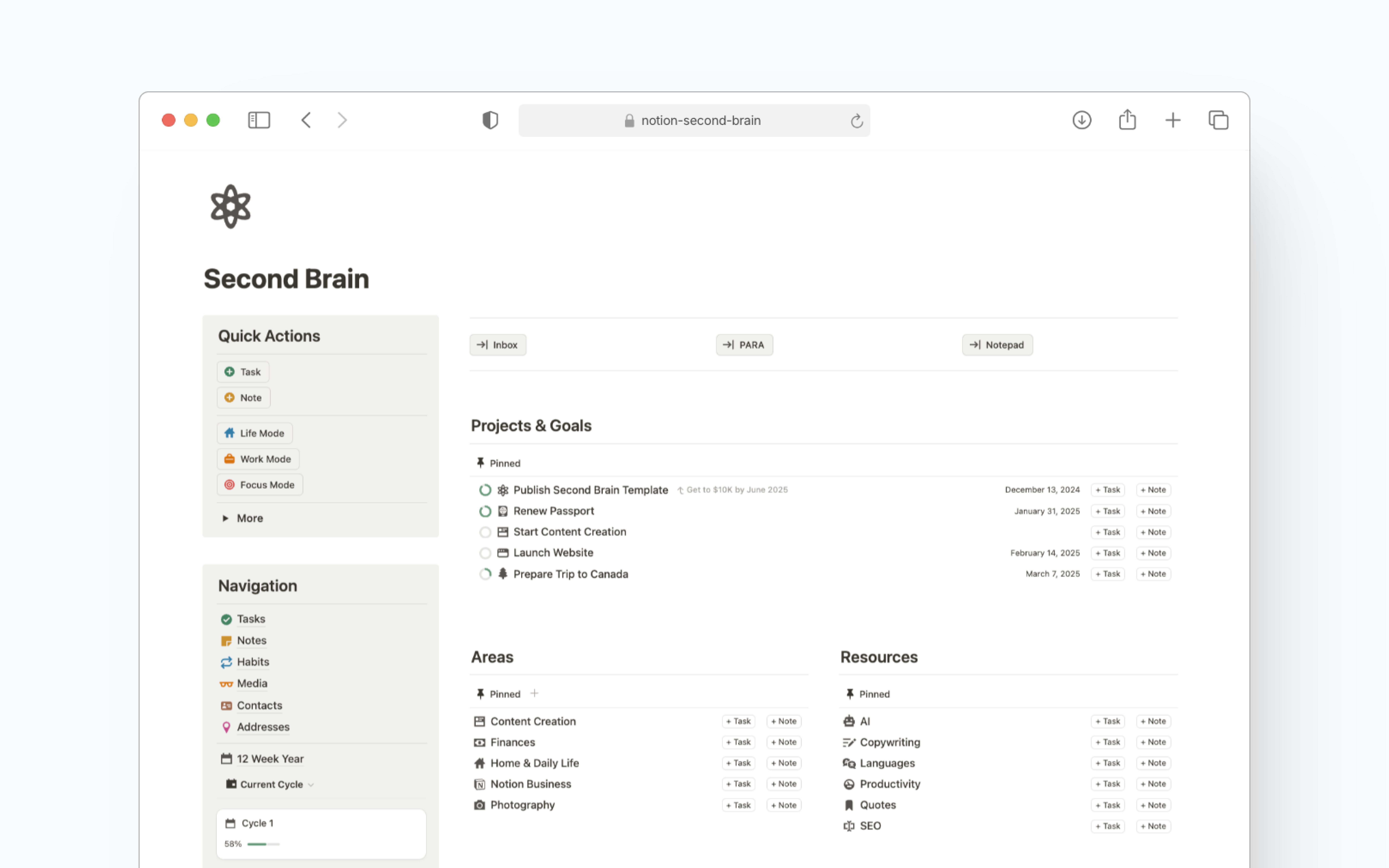
BlocksPad’s unique value includes a student discount, personalized support, and a growing library of resources. Whether you are new to Notion or a power user, BlocksPad delivers templates that scale with your ambitions and help you master your notion second brain.
Community Recommendations and User Reviews
Community feedback is a powerful way to evaluate notion second brain templates. Top-rated options often earn 4.9/5 stars from hundreds of users, who praise intuitive design, clear navigation, and helpful onboarding.
One user notes, “Intuitive design and navigation make it super easy to use—even for beginners.” Reading testimonials helps you gauge which templates are most effective in real-world scenarios.
Trying out several templates before committing to one is a smart approach. Many users iterate and combine elements from different notion second brain templates to build a personalized system.
Staying Updated with the Latest Templates
The notion second brain landscape evolves rapidly. To stay ahead, subscribe to Notion and template creator newsletters for the latest releases. Updates often include new features, bug fixes, and best practices aligned with Notion’s ongoing development.
Joining Notion communities is another way to discover trending templates and share experiences. Staying informed ensures you always benefit from the most current and effective notion second brain solutions.
If you’re ready to turn all these insights into real, lasting organization, I encourage you to explore the practical next step. Whether you’re a student looking for structure, a professional aiming to streamline projects, or someone who just wants life to feel a bit less overwhelmed, the right Notion template can make all the difference. At BlocksPad, you’ll find templates designed by a certified Notion creator—each crafted to help you bring your Second Brain to life, tailored to your unique needs. Take the next step toward clarity and efficiency:
Discover Notion Templates